1、JSP
在很多动态网页中,绝大部分内容都是固定不变的,只有局部内容需要动态产生和改变。 为了弥补Servlet的缺陷6,SUN公司在Servlet的基础上推出了JSP(Java Server Pages)页面服务器 JSP是简化Servlet编写的
JSP概述
什么是JSP
在很多动态网页中,绝大部分内容都是固定不变的,只有局部内容需要动态产生和改变。 为了弥补Servlet的缺陷6,SUN公司在Servlet的基础上推出了JSP(Java Server Pages)页面服务器
JSP是简化Servlet编写的一种技术,它将Java代码和HTML语句混合在同一个文件中编写,页面动态资源使用java代码,页面静态资源使用html标签。
简单来说:可以在html标签中嵌套java代码
作用:简化书写,展示动态页面
JSP的本质
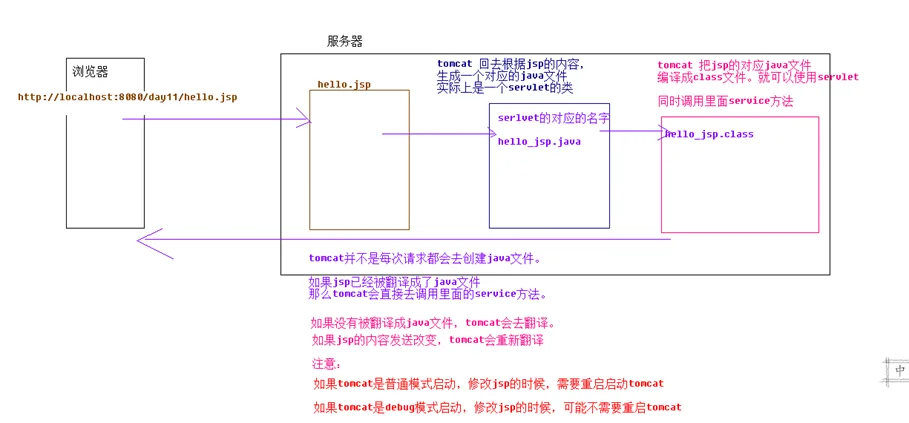
JSP本质上就是一个Servlet
jsp页面,运行的时候 ,会先生成一个java文件,必须进行编译,再去执行
Idea: 翻译路径:C:\Users\yanqi\.IntelliJIdea2018.2\system\tomcat\Unnamed_ServletDemo_3\work\Catalina\localhost\ServletDemo\org\apache\jsp

例如:hello.jsp 会被翻译成hello_jsp.java
jsp页面的名字加上下划线加上jsp。

每一段html的内容,都会被翻译成一个out.write(“””)这样的一段代码。service方法中。
执行过程
脚本和注释
JSP脚本
- <% 代码 %>脚本片段,生成在service方法中,每次请求的时候都会执行
- <%! 代码 %>声明片段,在java代码中声明成员,放在jsp生成java文件中的成员位置
- <%=代码 %>输出脚本片段,相当于out.print("代码") 方法,输出到jsp页面
<%!
        //成员变量
        int a = 10;
        //成员方法
        public int sum(int a ,int b ){
            return a+b;
        }
        //内部类
        class A{ }
    %>
    <%
        for (int i = 1; i <=10 ; i++) {
            // System.out.println(i);
            out.print(i);
        }
    %>
    <%= a %>
jsp和servlet的区别
jsp今后主要以页面为主,尽量不要书写java代码
servlet今后主要以业务逻辑为主,尽量不要书写页面
JSP注释
- html注释
<!-- 注释静态资源 -->
- JSP注释
<%-- 注释所有 --%>
- java注释(JSP脚本内使用)
// 单行
/* 多行 */
/**文档 */
作用范围
- html注释可以通过查看网页源代码可以查看jsp注释可以通过查看网页源代码不可以查看
JSP指令
什么是指令
用于配置JSP页面,导入资源文件
指令格式
<%@ 指令名称 属性名1="属性值1" 属性名2="属性值2" ...%>
JSP三大指令
page指令
主要用于配置当前jsp页面的一些信息
| 属性名 | 说明 |
|---|---|
| pageEncoding | 编码方式 |
| language | 目前仅支持java语言 |
| import | 导入jar包 |
| errorPage | 当前页面报错后,跳转指定错误提示页面 |
| isErrorPage | 声明当前jsp页面是一个异常处理页面,打开异常开关 false:(默认) true:可以操作exception异常对象 |
| autoFlush | 它是指在使用out方法输出的时候,是否自动刷新. 默认是true。会自动刷新 |
| buffer="8kb" | 当前页面的输出流的缓冲区大小。如果设置buffer=0 ,表示没有缓冲区 |
| isELIgnored | 是否运行使用el表达式 ,false允许使用 true是不允许使用。 |
| session | 指定一个http会话中是否使用会话 |
配置单个友好页面
<%@ page contentType="text/html;charset=UTF-8" language="java" errorPage="/500error.jsp" %>
<html>
<head>
    <title>Title</title>
</head>
<body>
    <%
        int a = 1/0;//当页面发生错误,跳转到指定的错误页面(配置友好页面)
    %>
</body>
</html>
以上配置的是单个友好错误页面,但今后开发过程中每个jsp页面都有可以发行错误,需要为每一个页面进行配置,很麻烦,可以通过web.xml配置当前项目的(全局)错误友好页面
配置全局友好页面
<error-page>
        <!--配置错误状态码-->
        <error-code>404</error-code>
        <!--配置错误友好页面-->
        <location>/404error.jsp</location>
    </error-page>
    <error-page>
        <error-code>500</error-code>
        <location>/500error.jsp</location>
    </error-page>
isErrorPage获取异常信息
<%@ page contentType="text/html;charset=UTF-8" language="java"  isErrorPage="true" %>
<html>
<head>
    <title>当前是一个错误的友好页面</title>
</head>
<body>
    <%--只有isErrorPage="true" 才可以使用exception对象 --%>
    <%= exception.getMessage()%>
</body>
</html>
include指令
页面包含的。导入页面的资源文件
格式
<%@include file="xxx.jsp"%>
<h2>我是头部</h2>
<h2>我是脚部</h2>
<%@include file="header.jsp"%>
	<h2>我是身体</h2>
<%@include file="fooder.jsp"%>
taglib指令
导入资源, 在jstl中我们会使用该指令导入标签库
| 属性名 | 说明 |
|---|---|
| prefix | 自定义前缀 |
<%@ page contentType="text/html;charset=UTF-8" language="java"  %>
<%--引入jstl核心标签库--%>
<%@taglib prefix="c" uri="http://java.sun.com/jsp/jstl/corek" %>
<html>
<head>
    <title>Title</title>
</head>
<body>
    <%--引入taglib指令,就可以使用相关的标签库--%>
</body>
</html>
JSP内置对象
作用
在JSP页面中不需要获取和创建,可以直接使用的对象,查看jsp底层源码service方法
九大内置对象
| 变量名 | 说明 | 作用 |
|---|---|---|
| pageContext | PageContext | 当前页面中共享数据(域对象) |
| request | HttpServletRequest | 一次请求中共享数据(域对象) |
| session | HttpSession | 一次会话中共享数据(域对象) |
| application | ServletContext | 整个web应用共享数据(域对象) |
| response | HttpServletResponse | 响应对象 |
| page(this) | Object | 当前页面(servlet)对象 |
| out | JSPWriter | 输出对象 |
| config | ServletConfig | servlet配置对象 |
| exception | Throwable | 异常对象(默认关闭...) |
常用内置对象
| 变量名 | 说明 |
|---|---|
| pageContext | 当前页面的域对象和获取其他八个内置对象 |
| request | 接收用户请求(参数)和 获取一次请求中域对象 |
| response | 设置响应:字节流和字符流 |
| out | 专门在jsp中处理字符流 print(): 可以输出一切类型 write():只能输出字符类型 |
pageContext
向四大域中存取数据
<%@ page contentType="text/html;charset=UTF-8" language="java" %>
<html>
    <head>
        <title>Title</title>
    </head>
    <body>
        <%
            pageContext.setAttribute("username","tom");
            pageContext.setAttribute("username","tom", PageContext.PAGE_SCOPE);
            pageContext.setAttribute("username","jack",PageContext.REQUEST_SCOPE);
            pageContext.setAttribute("username","rose",PageContext.SESSION_SCOPE);
            pageContext.setAttribute("username","yiyan",PageContext.APPLICATION_SCOPE);
        %>

        page:<%= pageContext.getAttribute("username")%><br>
        page:<%= pageContext.getAttribute("username",PageContext.PAGE_SCOPE)%><br>
        request:<%= pageContext.getAttribute("username",PageContext.REQUEST_SCOPE)%><br>
        session:<%= pageContext.getAttribute("username",PageContext.SESSION_SCOPE)%><br>
        application:<%= pageContext.getAttribute("username",PageContext.APPLICATION_SCOPE)%><br>

        <hr>
        <%--findAttribute  page request session application 范围查找--%>
        find:<%= pageContext.findAttribute("username") %>

    </body>
</html>
四个域对象作用范围
page  <  request  <  session  < ServletContext(application)
page:最小只是自己可以使用
request:一次请求可以使用
session:一次会话可以使用
application:整个项目运行过程中可以使用
常用request。
jsp的标签介绍
jsp:useBean标签
代替java代码在jsp中的书写,用标签即可完成
<%
        User user = new User();
        user.setUsername("jack");
        user.getUsername();
    %>
    <%--相当于User user = new User()--%>
    <jsp:useBean id="user" class="cn.yanqi.bean.User" scope="page"/>

    <%--user.setUsername("jack")--%>
    <jsp:setProperty name="user" property="username" value="jack"/>

    <%--user.getUsername()--%>
    <jsp:getProperty name="user" property="username"/>
jsp:include标签
包含其他页面
<jsp:include page="header.jsp"/>
    <h2>我是内容</h2>
    <jsp:include page="foot.jsp"/>
jsp:forward标签
可以实现转发
<jsp:forward page="login.html"/>
2、EL表达式
EL 全名为Expression Language,翻译成中文表达式语言
语法:${标识符} 作用就是输出标识符的所代表的值。
el出现目的:代替<%= %>,代替out.print();
常用功能
获取各种域(各种数据范围,servletContext(全局的),request(一次请求)中存储的数据

request.setAttribute(“name” ,value);
<%=request.getAttribute(“name”);>
等价于 ${requestScope.name}

从request这个对象中去取出数据。

el取不到值不显示
java代码取不到值返回null
体验EL表达式
修改注册案例中提示
//注册,不能注册相同的用户名
boolean bol = userService.regist(user);

if(bol){
    //转发到login.html中
    request.getRequestDispatcher("login.jsp").forward(request,response);
}else{
    request.setAttribute("msg","用户名已存在!!");
    request.getRequestDispatcher("regist.jsp").forward(request,response);
}
<h2>注册页面</h2>
<form action="RegistServlet" method="post">

    user:<input type="text" name="username">${requestScope.msg}<br>
    pwd:<input type="text" name="password"><br>
    pwd:<input type="text" name="nickname"><br>

    验证码:<input type="text" name="_img">
    <img src="/Checkcode"  id="_img"><br>

    <input type="submit">
</form>
EL取值
pageContext域
<%
    pageContext.setAttribute("username","tom");
    pageContext.setAttribute("username","tom", PageContext.PAGE_SCOPE);
    pageContext.setAttribute("username","jack",PageContext.REQUEST_SCOPE);
    pageContext.setAttribute("username","rose",PageContext.SESSION_SCOPE);
    pageContext.setAttribute("username","yiyan",PageContext.APPLICATION_SCOPE);
%>

    ${pageScope.username}
    ${requestScope.username}
    ${sessionScope.username}
    ${applicationScope.username}
数组
protected void doGet(HttpServletRequest request, HttpServletResponse response) throws ServletException, IOException {

        //业务层   dao

        //把查到的数据返回给web层
        int[] arr = {11,22,33,44,55,66};
        request.setAttribute("arr",arr);
        request.getRequestDispatcher("show.jsp").forward(request,response);

    }
<body>
	${requestScope.arr[0]}
    ${requestScope.arr[1]}
    ${requestScope.arr[2]}
    ${requestScope.arr[3]}
    ${requestScope.arr[4]}
    ${requestScope.arr[5]}

    <c:forEach items="${requestScope.arr}" var="i">
        ${i}
    </c:forEach>
 </body>
list集合
protected void doGet(HttpServletRequest request, HttpServletResponse response) throws ServletException, IOException {

        //web service  dao

        //把查询的结果放在list集合
        List<String> list = new ArrayList<>();
        list.add("tom");
        list.add("jack");
        list.add("rose");
        list.add("yiyan");

        request.setAttribute("list",list);
        request.getRequestDispatcher("show.jsp").forward(request,response);

    }
<body>

    <c:forEach items="${requestScope.list}" var="list">
        ${list}
    </c:forEach>

</body>
map集合
protected void doGet(HttpServletRequest request, HttpServletResponse response) throws ServletException, IOException {
        //web service  dao
        //把查询的结果放在map集合
        Map<String,String> map = new HashMap<>();
        map.put("a","aaa");
        map.put("b","bbb");
        map.put("c","ccc");
        map.put("d","ddd");

        request.setAttribute("map",map);
        request.getRequestDispatcher("show.jsp").forward(request,response);
    }
<body>

    ${requestScope.map.a}
    ${requestScope.map.b}
    ${requestScope.map.c}
    ${requestScope.map.d}

    <c:forEach items="${map}" var="map">
        key:${map.key}
        value:${map.value}
    </c:forEach>

</body>
EL的中括号和点的区别
protected void doGet(HttpServletRequest request, HttpServletResponse response) throws ServletException, IOException {

        //web service  dao
        //把查询的结果放在map集合
        Map<String,String> map = new HashMap<>();

        map.put("1","aaa");
        map.put("2","bbb");
        map.put("3","ccc");
        map.put("4","ddd");
        request.setAttribute("map",map);
        request.getRequestDispatcher("show.jsp").forward(request,response);

    }
<body>
	<%--如果map中的key数据,不能直接.出来,需要[]--%>
    ${requestScope.map["1"]}
    ${requestScope.map["2"]}
    ${requestScope.map["3"]}
    ${requestScope.map["4"]}

    <c:forEach items="${map}" var="map">
        key:${map.key}
        value:${map.value}
    </c:forEach>

</body>
java对象
protected void doGet(HttpServletRequest request, HttpServletResponse response) throws ServletException, IOException {

        //web service  dao
        //把查询的结果放在user对象
        User user = new User();
        user.setUsername("jack");
        user.setAddr("郑科");

        request.setAttribute("user",user);
        request.getRequestDispatcher("show.jsp").forward(request,response);

    }
<body>

    <%--直接对象.属性名--%>
    ${requestScope.user.username}
    ${requestScope.user.addr}

</body>
集合对象
protected void doGet(HttpServletRequest request, HttpServletResponse response) throws ServletException, IOException {

        //web service  dao
        //把查询的结果放在list集合
        List<User> list = new ArrayList<>();

        User user = new User();
        user.setUsername("jack");
        user.setAddr("郑科");
        list.add(user);

        request.setAttribute("list",list);
        request.getRequestDispatcher("show.jsp").forward(request,response);

    }
<body>

    <c:forEach items="${requestScope.list}" var="user">
        ${user.username}
        ${user.addr}
    </c:forEach>

</body>
EL 运算
常见运算符
| 运算符 | 说明 |
|---|---|
| 算数运算符 | +、- 、*、 /(div)、 %(mod) |
| 比较运算符 | > 、< 、>=、 <=、 ==、 != |
| 逻辑运算符 | &&(and)、 |
| 空运算符 | empty:用于判断字符串、集合、数组对象是否为null或者长度是否为0 |
代码演示
<%@ page import="java.util.List" %>
<%@ page import="java.util.ArrayList" %>
<%@ page contentType="text/html;charset=UTF-8" language="java" %>
<html>
    <head>
        <title>Title</title>
    </head>
    <body>
        <%
           int a = 4;
           int b = 3;

           request.setAttribute("a",a);
           request.setAttribute("b",b);
        %>

        <h3>算数运算符</h3>
        ${a / b} | ${a div b} <br>
        ${a % b} | ${a mod b} <br>

        <h3>比较运算符</h3>
        ${a == b} | ${a eq b} <br>
        ${a != b} | ${a ne b} <br>

        <h3>三元运算符</h3>
        ${a == b ? "a等于b" : "a不等于b"} <br>

        <h3>非空判断</h3>
        <%
            User user= null;
            request.setAttribute("user",user);

            List<String> list = new ArrayList<>();
            request.setAttribute("list",list);
        %>

        <%--
            相当于 if(user != null)
        --%>
        user对象: ${not empty user} <br>
        user对象: ${empty user} <br>

        <%--
             相当于 if(list != null && list.size() > 0)
        --%>
        list对象: ${not empty list} <br>
        list对象: ${empty list} <br>

    </body>
</html>
3、JSTL的核心标签库
什么是JSTL
JavaServer Pages Tag Library JSP标准标签库
是由Apache组织提供的开源的免费的jsp标签<标签>
JSTL的作用
用于简化和替换jsp页面上的java代码的编写
注意事项:需要手动添加jstl的jar包
c:if标签
相当于java代码中if语句
使用c:if 标签,在JSP页面上可以完成if判断。注意在JSTL核心标签库中没有c:else.只有c:if
<body>

    <%
        int a = 10;
        request.setAttribute("a",a);
    %>

    <c:if test="${requestScope.a > 10 }" var="a">
        登录失败!
    </c:if>

    <c:if test="${requestScope.a == 10}" var="a">
        登录成功!
    </c:if>


</body>
c:choose c:when c:otherwise标签
<c:choose>标签用于指定多个条件选择的组合边界,它必须与<c:when>和<c:otherwise>标签一起使用。
使用<c:choose>,<c:when>和<c:otherwise>三个标签,可以构造类似 “if-else if-else” 的复杂条件判断结构。
c:when ,c:otherwise 属于同一级别标签。同时是c:choose的子标签
它可以理解成switch结构。
c:choose 相当于switch
c:when 相当于 case
c:otherwise 相当于 default
<body>

    <%
        int a = 10;
        request.setAttribute("a",a);
    %>

    <c:choose>
        <c:when test="${a==1}">星期一</c:when>
        <c:when test="${a==2}">星期二</c:when>
        <c:when test="${a==3}">星期三</c:when>
        <c:otherwise>星期八</c:otherwise>
    </c:choose>

</body>
c:set标签
<body>

    <%--
        var:变量名
        value: 值
        scope: 范围
    --%>
    <c:set var="name" value="江一燕" scope="page"/>

    ${pageScope.name}

    <%
        User user = new User();
        user.setUsername("jack");
        request.setAttribute("user",user);
    %>

    原始数据:
    ${requestScope.user.username}

    <%--修改数据--%>
    <c:set target="${user}" property="username" value="rose"/>

    修改后数据:
    ${requestScope.user.username}
</body>
c:out标签
<body>

    <c:set var="name" value="江一燕" scope="page"/>

    <%--out是输出标签, value: 要取的值 default:如果你没有取到值给出默认值--%>
    <c:out value="${name123}" default="yanqi"/>

    <%
        String str ="<a href='https://www.baidu.com'>百度一下</a>";
        request.setAttribute("str",str);
    %>

    <%--
        escapeXml:表示输出的内容是html相关的,是否按照html格式输出
        true 默认:不会按html格式输出
        false: 按html格式输出
    --%>
    <c:out value="${str}" escapeXml="false"/>

</body>
c:forEach标签
数组的遍历
<body>

    <%
        int[] arr ={11,22,33,44,55,66};
        request.setAttribute("arr",arr);
    %>
    <c:forEach items="${arr}" var="i">
        ${i}
    </c:forEach>

    <hr>
    <c:forEach begin="0" end="4" step="2" var="i">
        ${arr[i]}
    </c:forEach>

</body>
list的遍历
参考el取list集合
map的遍历
参考el取map集合
JSTL中的其他标签
c:forTokens
<c:forTokens 它指的是把 itmes中提供的字符串,使用delims提供的分隔符进行分割
可以做到字符串的分割。
假设”a,b,c,d” 可以使用,进行字符串的分割 a b c d
c:import
<c:import url=""></c:import>可以在当当前页面引入其他的页面
c:remove
<c:remove var=""/> 删除某个域中的数据
c:catch
<c:catch var=”ex”></c:catch> 捕获异常的 ---当页面某些位置可能出现异常的时候,可以使用c:catch.不会报错500
c:redirect
<c:redirect context="/demo" url="/day13"></c:redirect> 完成重定向的
c:url
自动补齐应用名
c:param
c:param 给指定的页面进行参值