JAVAOOP
生活中,你肯定经历过这样的场景。当你编辑一个文本文件,忘记了ctrl+s ,可能文件就白白编辑了。当你电脑上插入一个U盘,可以把一个视频,拷贝到你的电脑硬盘里。那么数据都是在哪些设备上的呢?键盘、内存、硬盘、外接设备等等。 我们把这种数据的
二、IO流概述
2.1 什么是IO
生活中,你肯定经历过这样的场景。当你编辑一个文本文件,忘记了ctrl+s ,可能文件就白白编辑了。当你电脑上插入一个U盘,可以把一个视频,拷贝到你的电脑硬盘里。那么数据都是在哪些设备上的呢?键盘、内存、硬盘、外接设备等等。
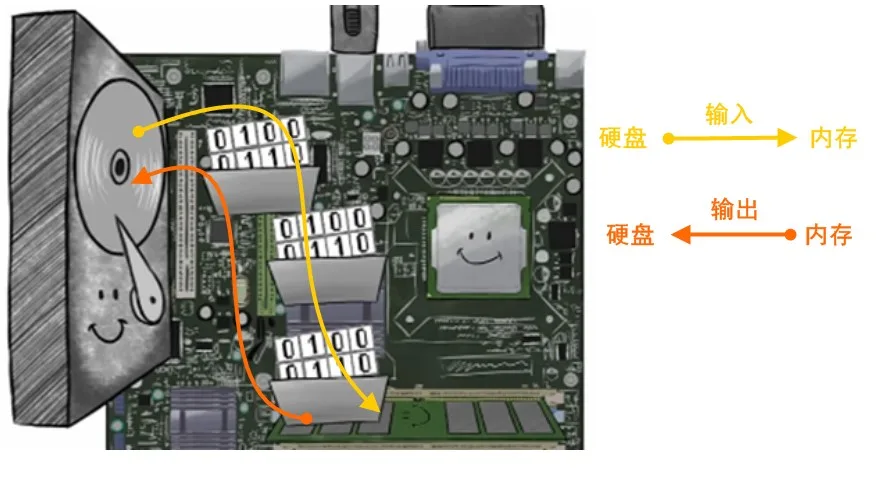
我们把这种数据的传输,可以看做是一种数据的流动,按照流动的方向,以内存为基准,分为输入input 和输出output ,即流向内存是输入流,流出内存的输出流。
Java中I/O操作主要是指使用java.io包下的内容,进行输入、输出操作。输入也叫做读取数据,输出也叫做作写出数据。
2.2 IO的分类
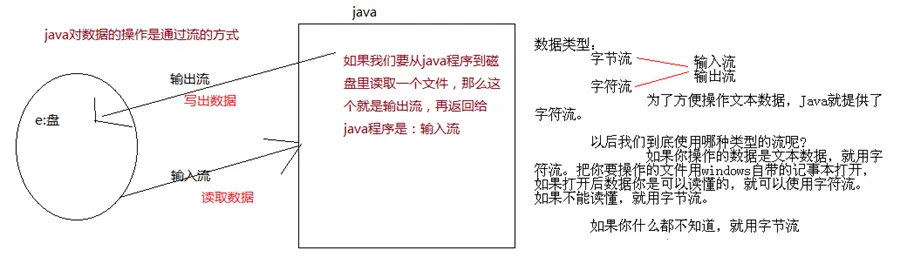
根据数据的流向分为:输入流和输出流。
- 输入流 :把数据从其他设备上读取到内存中的流。
- 输出流 :把数据从内存 中写出到其他设备上的流。
格局数据的类型分为:字节流和字符流。
- 字节流 :以字节为单位,读写数据的流。
- 字符流 :以字符为单位,读写数据的流。
2.3 IO的流向说明图解
2.4 IO顶级父类们
| 名称 | 输入流 | 输出流 |
|---|---|---|
| 字节流 | 字节输入流InputStream | 字节输出流OutputStream |
| 字符流 | 字符输入流Reader | 字符输出流Writer |
三、字节流
3.1 一切皆为字节
一切文件数据(文本、图片、视频等)在存储时,都是以二进制数字的形式保存,都一个一个的字节,那么传输时一样如此。所以,字节流可以传输任意文件数据。在操作流的时候,我们要时刻明确,无论使用什么样的流对象,底层传输的始终为二进制数据。
3.2 OutputStream
java.io.OutputStream抽象类是表示字节输出流的所有类的超类,将指定的字节信息写出到目的地。它定义了字节输出流的基本共性功能方法。
| 方法名 | 说明 |
|---|---|
| public abstract void write(int b) | 将指定的字节输出流。 |
| public void write(byte[] b) | 将 b.length字节从指定的字节数组写入此输出流。 |
| public void write(byte[] b, int off, int len) | 从指定的字节数组写入 len字节,从偏移量 off开始输 |
| public void close() | 关闭此输出流并释放与此流相关联的任何系统资源。 |
| public void flush() | 刷新此输出流并强制任何缓冲的输出字节被写出。 |
注意事项
close方法,当完成流的操作时,必须调用此方法,释放系统资源。
3.3 FileOutputStream类
java.io.FileOutputStream类是文件输出流,用于将数据写出到文件。
3.3.1 构造方法
| 方法名 | 说明 |
|---|---|
| public FileOutputStream(File file) | 创建文件输出流以写入由指定的 File对象表示的文件。 |
| public FileOutputStream(String name) | 创建文件输出流以指定的名称写入文件。 |
注意事项
当你创建一个流对象时,必须传入一个文件路径。该路径下,如果没有这个文件,会创建该文件。如果有这个文件,会清空这个文件的数据。
代码演示
public class FileOutputStreamConstructor throws IOException {
    public static void main(String[] args) {
   	 	// 使用File对象创建流对象
        File file = new File("a.txt");
        FileOutputStream fos = new FileOutputStream(file);

        // 使用文件名称创建流对象
        FileOutputStream fos = new FileOutputStream("b.txt");
    }
}
3.3.2 写出字节数据
写单个字节
使用write(int b) 方法,每次可以写出一个字节数据,代码使用演示:
public class FOSWrite {
    public static void main(String[] args) throws IOException {
        // 使用文件名称创建流对象
        FileOutputStream fos = new FileOutputStream("fos.txt");
      	// 写出数据
      	fos.write(97); // 写出第1个字节
      	fos.write(98); // 写出第2个字节
      	fos.write(99); // 写出第3个字节
      	// 关闭资源
        fos.close();
    }
}
写出字节数组
使用write(byte[] b),每次可以写出数组中的数据,代码使用演示:
public class FOSWrite {
    public static void main(String[] args) throws IOException {
        // 使用文件名称创建流对象
        FileOutputStream fos = new FileOutputStream("fos.txt");
      	// 字符串转换为字节数组
      	byte[] b = "我爱Java!".getBytes();
      	// 写出字节数组数据
      	fos.write(b);
      	// 关闭资源
        fos.close();
    }
}
写出指定长度字节数组
使用write(byte[] b, int off, int len) ,每次写出从off索引开始,len个字节,代码使用演示:
public class FOSWrite {
    public static void main(String[] args) throws IOException {
        // 使用文件名称创建流对象
        FileOutputStream fos = new FileOutputStream("fos.txt");
      	// 字符串转换为字节数组
      	byte[] b = "abcde".getBytes();
		// 写出从索引2开始,2个字节。索引2是c,两个字节,也就是cd。
        fos.write(b,2,2);
      	// 关闭资源
        fos.close();
    }
}
3.3.3 数据追加续写
经过以上的演示,每次程序运行,创建输出流对象,都会清空目标文件中的数据。如何保留目标文件中数据,还能继续添加新数据呢?我们就需要了解其他两个构造方法了!
| 方法名 | 说明 |
|---|---|
| public FileOutputStream(File file,boolean append) | 创建文件输出流以写入由指定的 File对象表示的文件。 |
| public FileOutputStream(String name, boolean append) | 创建文件输出流以指定的名称写入文件。 |
这两个构造方法,参数中都需要传入一个boolean类型的值,true 表示追加数据,false 表示清空原有数据。这样创建的输出流对象,就可以指定是否追加续写了
public class FOSWrite {
    public static void main(String[] args) throws IOException {
        // 使用文件名称创建流对象
        FileOutputStream fos = new FileOutputStream("fos.txt",true);
      	// 字符串转换为字节数组
      	byte[] b = "abcde".getBytes();
		// 写出从索引2开始,2个字节。索引2是c,两个字节,也就是cd。
        fos.write(b);
      	// 关闭资源
        fos.close();
    }
}
3.3.4 写出换行
如果写的数据比较多,那么就会在文件中在一行展示。会造成阅读不方便。我们现在的需求是,每写一次数据,都要从下行开始,这个时候就要涉及到换行的问题。
- 回车符\r和换行符\n :
- 回车符:回到一行的开头(return)。
- 换行符:下一行(newline)。
- 系统中的换行:
- Windows系统里,每行结尾是 回车+换行 ,即\r\n;
- Unix系统里,每行结尾只有 换行 ,即\n;
- Mac系统里,每行结尾是 回车 ,即\r。从 Mac OS X开始与Linux统一。
代码演示
public class FOSWrite {
    public static void main(String[] args) throws IOException {
        // 使用文件名称创建流对象
        FileOutputStream fos = new FileOutputStream("fos.txt");
      	// 定义字节数组
      	byte[] words = {97,98,99,100,101};
      	// 遍历数组
        for (int i = 0; i < words.length; i++) {
          	// 写出一个字节
            fos.write(words[i]);
          	// 写出一个换行, 换行符号转成数组写出
            fos.write("\r\n".getBytes());
        }
      	// 关闭资源
        fos.close();
    }
}
3.4 InputStream
java.io.InputStream抽象类是表示字节输入流的所有类的超类,可以读取字节信息到内存中。它定义了字节输入流的基本共性功能方法
| 方法名 | 说明 |
|---|---|
| public void close() | 关闭此输入流并释放与此流相关联的任何系统资源。 |
| public abstract int read() | 从输入流读取数据的下一个字节。 |
| public int read(byte[] b) | 从输入流中读取一些字节数,并将它们存储到字节数组 b中 。 |
close方法,当完成流的操作时,必须调用此方法,释放系统资源。
3.5 FileInputStream类
java.io.FileInputStream类是文件输入流,从文件中读取字节。
3.5.1 FileInputStream类构造
| 方法名 | 说明 |
|---|---|
| FileInputStream(File file) | 通过打开与实际文件的连接来创建一个 FileInputStream ,该文件由文件系统中的 File对象 file命名。 |
| FileInputStream(String name) | 通过打开与实际文件的连接来创建一个 FileInputStream ,该文件由文件系统中的路径名 name命名。 |
当你创建一个流对象时,必须传入一个文件路径。该路径下,如果没有该文件,会抛出FileNotFoundException
public class FileInputStreamConstructor throws IOException{
    public static void main(String[] args) {
   	 	// 使用File对象创建流对象
        File file = new File("a.txt");
        FileInputStream fos = new FileInputStream(file);

        // 使用文件名称创建流对象
        FileInputStream fos = new FileInputStream("b.txt");
    }
}
3.5.2 读取字节数据
一次读取一个字节
read方法,每次可以读取一个字节的数据,提升为int类型,读取到文件末尾,返回-1
public class FISRead {
    public static void main(String[] args) throws IOException{
      	// 使用文件名称创建流对象
       	FileInputStream fis = new FileInputStream("read.txt");
      	// 读取数据,返回一个字节
        int read = fis.read();
        System.out.println((char) read);
        read = fis.read();
        System.out.println((char) read);
        read = fis.read();
        System.out.println((char) read);
        read = fis.read();
        System.out.println((char) read);
        read = fis.read();
        System.out.println((char) read);
      	// 读取到末尾,返回-1
       	read = fis.read();
        System.out.println( read);
		// 关闭资源
        fis.close();
    }
}
循环改进读取方式
public class FISRead {
    public static void main(String[] args) throws IOException{
      	// 使用文件名称创建流对象
       	FileInputStream fis = new FileInputStream("read.txt");
      	// 定义变量,保存数据
        int b ;
        // 循环读取
        while ((b = fis.read())!=-1) {
            System.out.println((char)b);
        }
		// 关闭资源
        fis.close();
    }
}
一次读取一个字节数组
read(byte[] b),每次读取b的长度个字节到数组中,返回读取到的有效字节个数,读取到末尾时,返回-1
public class FISRead {
    public static void main(String[] args) throws IOException{
      	// 使用文件名称创建流对象.
       	FileInputStream fis = new FileInputStream("read.txt"); // 文件中为abcde
      	// 定义变量,作为有效个数
        int len ;
        // 定义字节数组,作为装字节数据的容器
        byte[] b = new byte[2];
        // 循环读取
        while (( len= fis.read(b))!=-1) {
           	// 每次读取后,把数组变成字符串打印
            System.out.println(new String(b));
        }
		// 关闭资源
        fis.close();
    }
}
错误数据d,是由于最后一次读取时,只读取一个字节e,数组中,上次读取的数据没有被完全替换,所以要通过len ,获取有效的字节
public class FISRead {
    public static void main(String[] args) throws IOException{
      	// 使用文件名称创建流对象.
       	FileInputStream fis = new FileInputStream("read.txt"); // 文件中为abcde
      	// 定义变量,作为有效个数
        int len ;
        // 定义字节数组,作为装字节数据的容器
        byte[] b = new byte[2];
        // 循环读取
        while (( len= fis.read(b))!=-1) {
           	// 每次读取后,把数组的有效字节部分,变成字符串打印
            System.out.println(new String(b,0,len));//  len 每次读取的有效字节个数
        }
		// 关闭资源
        fis.close();
    }
}
3.6 图片复制
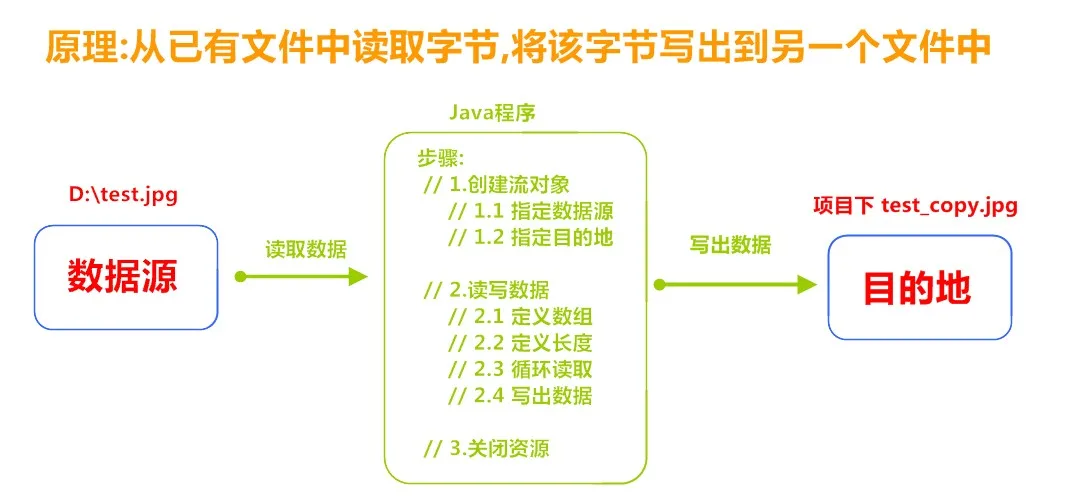
3.6.1 复制原理
 3.6.2 代码实现
public class Copy {
    public static void main(String[] args) throws IOException {
        // 1.创建流对象
        // 1.1 指定数据源
        FileInputStream fis = new FileInputStream("D:\\test.jpg");
        // 1.2 指定目的地
        FileOutputStream fos = new FileOutputStream("test_copy.jpg");

        // 2.读写数据
        // 2.1 定义数组
        byte[] b = new byte[1024];
        // 2.2 定义长度
        int len;
        // 2.3 循环读取
        while ((len = fis.read(b))!=-1) {
            // 2.4 写出数据
            fos.write(b, 0 , len);
        }

        // 3.关闭资源
        fos.close();
        fis.close();
    }
}
四、字符流
当使用字节流读取文本文件时,可能会有一个小问题。就是遇到中文字符时,可能不会显示完整的字符,那是因为一个中文字符可能占用多个字节存储。所以Java提供一些字符流类,以字符为单位读写数据,专门用于处理文本文件。
4.1 Reader
java.io.Reader抽象类是表示用于读取字符流的所有类的超类,可以读取字符信息到内存中。它定义了字符输入流的基本共性功能方法。
| 方法名 | 说明 |
|---|---|
| public void close() | 关闭此流并释放与此流相关联的任何系统资源。 |
| public int read() | 从输入流读取一个字符。 |
| public int read(char[] cbuf) | 从输入流中读取一些字符,并将它们存储到字符数组 cbuf中 |
4.2 FileReader类
java.io.FileReader类是读取字符文件的便利类。构造时使用系统默认的字符编码和默认字节缓冲区。
注意事项
- 字符编码:字节与字符的对应规则。Windows系统的中文编码默认是GBK编码表。idea中UTF-8
- 字节缓冲区:一个字节数组,用来临时存储字节数据。
4.2.1 FileReader类构造方法
| 方法名 | 说明 |
|---|---|
| FileReader(File file) | 创建一个新的 FileReader ,给定要读取的File对象。 |
| FileReader(String fileName) | 创建一个新的 FileReader ,给定要读取的文件的名称。 |
当你创建一个流对象时,必须传入一个文件路径。类似于FileInputStream 。
代码演示
public class FileReaderConstructor throws IOException{
    public static void main(String[] args) {
   	 	// 使用File对象创建流对象
        File file = new File("a.txt");
        FileReader fr = new FileReader(file);

        // 使用文件名称创建流对象
        FileReader fr = new FileReader("b.txt");
    }
}
4.2.2 读取字符数据
一次读取一个字符
read方法,每次可以读取一个字符的数据,提升为int类型,读取到文件末尾,返回-1
public class FRRead {
    public static void main(String[] args) throws IOException {
      	// 使用文件名称创建流对象
       	FileReader fr = new FileReader("read.txt");
      	// 定义变量,保存数据
        int b ;
        // 循环读取
        while ((b = fr.read())!=-1) {
            System.out.println((char)b);
        }
		// 关闭资源
        fr.close();
    }
}
一次读取一个字符数组
read(char[] cbuf),每次读取b的长度个字符到数组中,返回读取到的有效字符个数,读取到末尾时,返回-1
public class FRRead {
    public static void main(String[] args) throws IOException {
      	// 使用文件名称创建流对象
       	FileReader fr = new FileReader("read.txt");
      	// 定义变量,保存有效字符个数
        int len ;
        // 定义字符数组,作为装字符数据的容器
         char[] cbuf = new char[2];
        // 循环读取
        while ((len = fr.read(cbuf))!=-1) {
            System.out.println(new String(cbuf));
        }
		// 关闭资源
        fr.close();
    }
}
4.3 Writer
java.io.Writer抽象类是表示用于写出字符流的所有类的超类,将指定的字符信息写出到目的地。它定义了字节输出流的基本共性功能方法。
| 方法名 | 说明 |
|---|---|
| void write(int c) | 写入单个字符 |
| void write(char[] cbuf) | 写入字符数组。 |
| abstract void write(char[] cbuf, int off, int len) | 写入字符数组的某一部分,off数组的开始索引,len写的字符个数 |
| void write(String str) | 写入字符串 |
| void write(String str, int off, int len) | 写入字符串的某一部分,off字符串的开始索引,len写的字符个数。 |
| void flush() | 刷新该流的缓冲。 |
| void close() | 关闭此流,但要先刷新它。 |
4.4 FileWriter类
java.io.FileWriter类是写出字符到文件的便利类。构造时使用系统默认的字符编码和默认字节缓冲区。
4.4.1 FileWriter类构造方法
| 方法名 | 说明 |
|---|---|
| FileWriter(File file) | 创建一个新的 FileWriter,给定要读取的File对象。 |
| FileWriter(String fileName) | 创建一个新的 FileWriter,给定要读取的文件的名称。 |
当你创建一个流对象时,必须传入一个文件路径,类似于FileOutputStream。
代码演示
public class FileWriterConstructor {
    public static void main(String[] args) throws IOException {
   	 	// 使用File对象创建流对象
        File file = new File("a.txt");
        FileWriter fw = new FileWriter(file);

        // 使用文件名称创建流对象
        FileWriter fw = new FileWriter("b.txt");
    }
}
4.4.2 写数据
一次写一个字符
write(int b) 方法,每次可以写出一个字符数据
public class FWWrite {
    public static void main(String[] args) throws IOException {
        // 使用文件名称创建流对象
        FileWriter fw = new FileWriter("fw.txt");
      	// 写出数据
      	fw.write(97); // 写出第1个字符
      	fw.write('b'); // 写出第2个字符
      	fw.write('C'); // 写出第3个字符
      	fw.write(30000); // 写出第4个字符,中文编码表中30000对应一个汉字。

      	/*
        【注意】关闭资源时,与FileOutputStream不同。
      	 如果不关闭,数据只是保存到缓冲区,并未保存到文件。
        */
        // fw.close();
    }
}
flush与close之间的区别
因为内置缓冲区的原因,如果不关闭输出流,无法写出字符到文件中。但是关闭的流对象,是无法继续写出数据的。如果我们既想写出数据,又想继续使用流,就需要flush 方法了。
- flush :刷新缓冲区,流对象可以继续使用。
- close:先刷新缓冲区,然后通知系统释放资源。流对象不可以再被使用了。
代码演示
public class FWWrite {
    public static void main(String[] args) throws IOException {
        // 使用文件名称创建流对象
        FileWriter fw = new FileWriter("fw.txt");
        // 写出数据,通过flush
        fw.write('刷'); // 写出第1个字符
        fw.flush();
        fw.write('新'); // 继续写出第2个字符,写出成功
        fw.flush();

      	// 写出数据,通过close
        fw.write('关'); // 写出第1个字符
        fw.close();
        fw.write('闭'); // 继续写出第2个字符,【报错】java.io.IOException: Stream closed
        fw.close();
    }
}
注意: 即便是flush方法写出了数据,操作的最后还是要调用close方法,释放系统资源。
一次写一个字符数组
write(char[] cbuf) 和 write(char[] cbuf, int off, int len) ,每次可以写出字符数组中的数据,用法类似FileOutputStream
public class FWWrite {
    public static void main(String[] args) throws IOException {
        // 使用文件名称创建流对象
        FileWriter fw = new FileWriter("fw.txt");
      	// 字符串转换为字节数组
      	char[] chars = "Hello".toCharArray();

      	// 写出字符数组
      	fw.write(chars); // Hello
        fw.write(b,2,2);

      	// 关闭资源
        fos.close();
    }
}
一次写一个字符串
write(String str) 和 write(String str, int off, int len) ,每次可以写出字符串中的数据,更为方便
public class FWWrite {
    public static void main(String[] args) throws IOException {
        // 使用文件名称创建流对象
        FileWriter fw = new FileWriter("fw.txt");
      	// 字符串
      	String msg = "Hello";

      	// 写出字符数组
      	fw.write(msg); //Hello
        fw.write(msg,2,2);

        // 关闭资源
        fos.close();
    }
}
续写和换行
public class FWWrite {
    public static void main(String[] args) throws IOException {
        // 使用文件名称创建流对象,可以续写数据
        FileWriter fw = new FileWriter("fw.txt",true);
      	// 写出字符串
        fw.write("hello");
      	// 写出换行
      	fw.write("\r\n");
      	// 写出字符串
  		fw.write("world");
      	// 关闭资源
        fw.close();
    }
}