/7 分钟/3 阅读/0 评论
SpringJdbcTemplate
Spring JdbcTemplate 是一个模板工具类,简化Jdbc编程 (类似 Apache DbUtils) spring核心包4+2 jdbc模板包2个 目标:将数据源和jdbcTemplate都交给Spring来管理: 在appl
Spring JdbcTemplate 是一个模板工具类,简化Jdbc编程 (类似 Apache DbUtils)
添加依赖
spring核心包4+2 jdbc模板包2个
<!--spring-jdbc-->
<dependency>
    <groupId>org.springframework</groupId>
    <artifactId>spring-jdbc</artifactId>
    <version>5.2.9.RELEASE</version>
</dependency>

<dependency>
    <groupId>org.springframework</groupId>
    <artifactId>spring-tx</artifactId>
    <version>5.2.9.RELEASE</version>
</dependency>
测试
@Test
public void test(){

    //构建数据源
    DriverManagerDataSource dataSource = new DriverManagerDataSource();
    dataSource.setDriverClassName("com.mysql.jdbc.Driver");
    dataSource.setUrl("jdbc:mysql:///test");
    dataSource.setUsername("root");
    dataSource.setPassword("root");

	//获取对象
    JdbcTemplate jdbcTemplate = new JdbcTemplate(dataSource);

    //创建表
    jdbcTemplate.execute("create table test01(name varchar(10) )");

}
Spring配置数据源
目标:将数据源和jdbcTemplate都交给Spring来管理:
在applicationContext.xml中配置dataSource连接池和jdbcTemplate模版对象。
spring内置数据源
<!--sproing内置数据源-->
<bean id="dataSource" class="org.springframework.jdbc.datasource.DriverManagerDataSource">
    <property name="driverClassName" value="com.mysql.jdbc.Driver"/>
    <property name="url" value="jdbc:mysql:///test"/>
    <property name="username" value="root"/>
    <property name="password" value="root"/>
</bean>
<!--jdbcTemplate-->
<bean id="jdbcTemplate" class="org.springframework.jdbc.core.JdbcTemplate">
    <property name="dataSource" ref="dataSource"/>
</bean>
@RunWith(SpringJUnit4ClassRunner.class)
@ContextConfiguration(locations = "classpath:applicationContext.xml")
public class JdbcTempleTest {

    //注入jdbcTemplate
    @Autowired
    private JdbcTemplate jdbcTemplate;

    @Test
    public void test(){
        this.jdbcTemplate.execute("create table jdbctest05(name varchar(10))");
    }
}
dbcp数据源
Apache commons-dbcp 需要导入dbcp包和 pool包
添加依赖
<dependency>
  <groupId>commons-dbcp</groupId>
  <artifactId>commons-dbcp</artifactId>
  <version>1.4</version>
</dependency>
<!--dbcp数据源-->
<bean id="dataSource2" class="org.apache.commons.dbcp.BasicDataSource">
    <property name="driverClassName" value="com.mysql.jdbc.Driver"/>
    <property name="url" value="jdbc:mysql:///test"/>
    <property name="username" value="root"/>
    <property name="password" value="root"/>
</bean>
<!--jdbcTemplate-->
<bean id="jdbcTemplate" class="org.springframework.jdbc.core.JdbcTemplate">
    <property name="dataSource" ref="dataSource2"/>
</bean>
@RunWith(SpringJUnit4ClassRunner.class)
@ContextConfiguration(locations = "classpath:applicationContext.xml")
public class JdbcTempleTest {

    //注入jdbcTemplate
    @Autowired
    private JdbcTemplate jdbcTemplate;

    @Test
    public void test(){
        this.jdbcTemplate.execute("create table jdbctest06(name varchar(10))");
    }
}
C3P0 数据源
<dependency>
  <groupId>com.mchange</groupId>
  <artifactId>c3p0</artifactId>
  <version>0.9.5.2</version>
</dependency>
<!--c3p0数据源-->
<bean id="dataSource3" class="com.mchange.v2.c3p0.ComboPooledDataSource">
    <property name="driverClass" value="com.mysql.jdbc.Driver"/>
    <property name="jdbcUrl" value="jdbc:mysql:///test"/>
    <property name="user" value="root"/>
    <property name="password" value="root"/>
</bean>
<!--jdbcTemplate-->
<bean id="jdbcTemplate" class="org.springframework.jdbc.core.JdbcTemplate">
    <property name="dataSource" ref="dataSource3"/>
</bean>
@RunWith(SpringJUnit4ClassRunner.class)
@ContextConfiguration(locations = "classpath:applicationContext.xml")
public class JdbcTempleTest {

    //注入jdbcTemplate
    @Autowired
    private JdbcTemplate jdbcTemplate;

    @Test
    public void test(){
        this.jdbcTemplate.execute("create table jdbctest07(name varchar(10))");
    }
}
Druid数据源
<!--druid-->
<dependency>
    <groupId>com.alibaba</groupId>
    <artifactId>druid</artifactId>
    <version>1.2.3</version>
</dependency>
<!--druid数据源-->
<bean id="dataSource4" class="com.alibaba.druid.pool.DruidDataSource">
    <property name="driverClassName" value="com.mysql.jdbc.Driver"/>
    <property name="url" value="jdbc:mysql:///test"/>
    <property name="username" value="root"/>
    <property name="password" value="root"/>
    <!--最大连接数-->
    <property name="maxActive" value="5"/>
    <!--最小连接数-->
    <property name="minIdle" value="1"/>
</bean>

<!--jdbcTemplate-->
<bean id="jdbcTemplate" class="org.springframework.jdbc.core.JdbcTemplate">
    <property name="dataSource" ref="dataSource4"/>
</bean>
@RunWith(SpringJUnit4ClassRunner.class)
@ContextConfiguration(locations = "classpath:applicationContext.xml")
public class JdbcTempleTest {

    //注入jdbcTemplate
    @Autowired
    private JdbcTemplate jdbcTemplate;

    @Test
    public void test(){
        this.jdbcTemplate.execute("create table jdbctest07(name varchar(10))");
    }
}
- 相关配置
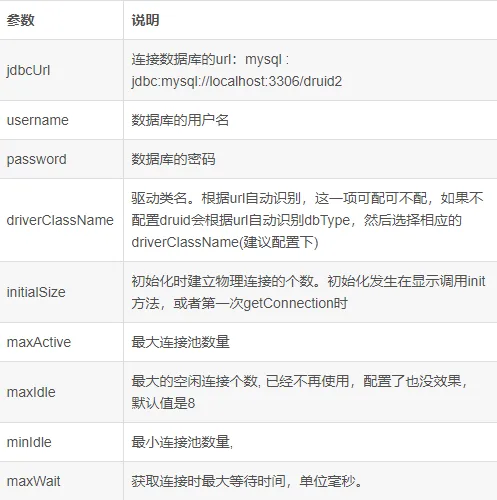
外部属性文件的配置
- db.properties
jdbc.driverClass=com.mysql.cj.jdbc.Driver
jdbc.jdbcurl=jdbc:mysql:///test?serverTimezone=Asia/Shanghai
jdbc.username=root
jdbc.password=root
- applicationContext.xml
<!--引入外部的文件-->
<context:property-placeholder location="classpath:db.properties"/>

<!--druid数据源-->
<bean id="dataSource4" class="com.alibaba.druid.pool.DruidDataSource">
    <property name="driverClassName" value="${jdbc.driverClass}"/>
    <property name="url" value="${jdbc.jdbcurl}"/>
    <property name="username" value="${jdbc.username}"/>
    <property name="password" value="${jdbc.password}"/>
    <!--最大连接数-->
    <property name="maxActive" value="5"/>
    <!--最小连接数-->
    <property name="minIdle" value="1"/>
</bean>
基于JdbcTemplate实现CURD
数据库准备
CREATE TABLE `t_book` (
  `id` int(11) NOT NULL,
  `name` varchar(255) DEFAULT NULL,
  `price` decimal(10,2) DEFAULT NULL,
  PRIMARY KEY (`id`)
) ENGINE=InnoDB DEFAULT CHARSET=utf8;
查询
实体类
@Data
public class Book {
    private Integer id;
    private String name;
    private Double price;
}
dao层
/**
 * @Auther: yanqi
 * @Desc: 继承 JdbcDaoSupport类,父类中已注入JdbcTemplate对象
 */
public class BookDao extends JdbcDaoSupport {

    /**
     * 查询所有
     */
    public List<Book> queryAll(){
        return super.getJdbcTemplate().query("select * from t_book", new BeanPropertyRowMapper<>(Book.class));
    }
}
数据源
<!--引入外部的配置文件db.properties-->
<context:property-placeholder location="classpath:db.properties"/>

<!--Druid连接池-->
<bean id="dataSource4" class="com.alibaba.druid.pool.DruidDataSource">
    <property name="driverClassName" value="${jdbc.driverClass}"/>
    <property name="url" value="${jdbc.jdbcurl}"/>
    <property name="username" value="${jdbc.username}"/>
    <property name="password" value="${jdbc.password}"/>
</bean>

<!--dao层-->
<bean id="bookDao" class="cn.yanqi.dao.BookDao">
    <property name="dataSource" ref="dataSource4"/>
</bean>
- db.properties
jdbc.driverClass=com.mysql.jdbc.Driver
jdbc.jdbcurl=jdbc:mysql:///test
jdbc.username=root
jdbc.password=root
- 测试
/**
 * @Auther: yanqi
 */
@RunWith(SpringJUnit4ClassRunner.class)
@ContextConfiguration(locations = "classpath:applicationContext.xml")
public class JdbcTemplateTest {

    @Autowired
    private BookDao bookDao;

    @Test
    public void test2(){
        List<Book> books = this.bookDao.queryAll();
        for(Book book : books){
            System.out.println(book);
        }
    }

}
实现增加、删除、修改功能
/**
 * 添加
 */
public void addBook(Book book){
    String sql = "insert into t_book(id,name,price) values(null,?,?)";
    super.getJdbcTemplate().update(sql,book.getId(),book.getName(),book.getPrice());
}

/**
 * 删除
 */
public void deleteBook(Integer id){
    String sql = "delete from t_book where id = ?";
    super.getJdbcTemplate().update(sql,id);
}

/**
 * 修改
 */
public void updateBook(Book book){
    String sql = "update t_book set name = ? where id = ?";
    super.getJdbcTemplate().update(sql,book.getName(),book.getId());
}
Spring事务管理
基于_XML的事务管理
编写转账案例,引出事务问题
- 数据库准备
CREATE TABLE `t_account` (
  `id` int(11) DEFAULT NULL,
  `name` varchar(255) DEFAULT NULL,
  `money` double DEFAULT NULL
) ENGINE=InnoDB DEFAULT CHARSET=utf8;
spring-transaction
- 添加依赖
<dependencies>

    <dependency>
      <groupId>com.alibaba</groupId>
      <artifactId>druid</artifactId>
      <version>1.2.3</version>
    </dependency>

    <dependency>
      <groupId>mysql</groupId>
      <artifactId>mysql-connector-java</artifactId>
      <version>5.1.47</version>
    </dependency>

    <dependency>
      <groupId>org.slf4j</groupId>
      <artifactId>slf4j-log4j12</artifactId>
      <version>1.6.4</version>
    </dependency>

    <dependency>
      <groupId>log4j</groupId>
      <artifactId>log4j</artifactId>
      <version>1.2.17</version>
    </dependency>

    <dependency>
      <groupId>org.springframework</groupId>
      <artifactId>spring-jdbc</artifactId>
      <version>5.2.9.RELEASE</version>
    </dependency>

    <dependency>
      <groupId>org.springframework</groupId>
      <artifactId>spring-aop</artifactId>
      <version>5.2.9.RELEASE</version>
    </dependency>

    <dependency>
      <groupId>org.springframework</groupId>
      <artifactId>spring-context</artifactId>
      <version>5.2.9.RELEASE</version>
    </dependency>

    <dependency>
      <groupId>org.springframework</groupId>
      <artifactId>spring-test</artifactId>
      <version>5.2.9.RELEASE</version>
    </dependency>
    <dependency>
      <groupId>junit</groupId>
      <artifactId>junit</artifactId>
      <version>4.12</version>
      <scope>runtime</scope>
    </dependency>
  </dependencies>
- dao层
public class AccountDao extends JdbcDaoSupport {
    public void out(String outName , double money){
        String sql = "update t_account set money = money - ? where name = ?";
        this.getJdbcTemplate().update(sql,money,outName);
    }

    public void in(String inName , double money){
        String sql = "update t_account set money = money + ? where name = ?";
        this.getJdbcTemplate().update(sql,money,inName);
    }

}
- service层
public class AccountService {

    private AccountDao accountDao;
    public void setAccountDao(AccountDao accountDao) {
        this.accountDao = accountDao;
    }

    public void tranfar(String outName , String  inName , double money){

        this.accountDao.out(outName,money);

        int a = 1/0;

        this.accountDao.in(inName,money);
    }
}
- db.properties
jdbc.driverClass=com.mysql.jdbc.Driver
jdbc.url=jdbc:mysql:///test
jdbc.username=root
jdbc.password=root
- applicationContext.xml
<beans xmlns="http://www.springframework.org/schema/beans"
       xmlns:xsi="http://www.w3.org/2001/XMLSchema-instance" xmlns:aop="http://www.springframework.org/schema/aop"
       xmlns:context="http://www.springframework.org/schema/context"
       xsi:schemaLocation="
   http://www.springframework.org/schema/beans
   http://www.springframework.org/schema/beans/spring-beans.xsd
   http://www.springframework.org/schema/aop
   http://www.springframework.org/schema/aop/spring-aop.xsd
   http://www.springframework.org/schema/context
   http://www.springframework.org/schema/context/spring-context.xsd">


    <!--扫描包-->
    <context:component-scan base-package="cn.yanqi"/>

    <!--引入外部的文件-->
    <context:property-placeholder location="classpath:db.properties"/>

    <!--druid数据源-->
    <bean id="dataSource4" class="com.alibaba.druid.pool.DruidDataSource">
        <property name="driverClassName" value="${jdbc.driverClass}"/>
        <property name="url" value="${jdbc.url}"/>
        <property name="username" value="${jdbc.username}"/>
        <property name="password" value="${jdbc.password}"/>
        <!--最大连接数-->
        <property name="maxActive" value="5"/>
        <!--最小连接数-->
        <property name="minIdle" value="1"/>
    </bean>

    <!--dao-->
    <bean id="accountDao" class="cn.yanqi.dao.AccountDao">
        <property name="dataSource" ref="dataSource4"/>
    </bean>

    <!--service-->
    <bean id="accountService" class="cn.yanqi.service.AccountService">
        <property name="accountDao" ref="accountDao"/>
    </bean>
</beans>
发现事务管理问题:没有事务的情况下,如果出现异常,则会转账不成功,数据异常。
扩展:如果不配置事务,那么每一个数据库的操作都是单独的一个事务。
加入事务
- 添加tx事务约束
<beans xmlns="http://www.springframework.org/schema/beans"
       xmlns:xsi="http://www.w3.org/2001/XMLSchema-instance"
       xmlns:context="http://www.springframework.org/schema/context"
       xmlns:aop="http://www.springframework.org/schema/aop"
       xmlns:tx="http://www.springframework.org/schema/tx"
       xsi:schemaLocation="http://www.springframework.org/schema/beans
   http://www.springframework.org/schema/beans/spring-beans.xsd
   http://www.springframework.org/schema/context
   http://www.springframework.org/schema/context/spring-context.xsd
   http://www.springframework.org/schema/aop
   http://www.springframework.org/schema/aop/spring-aop.xsd
   http://www.springframework.org/schema/tx
   http://www.springframework.org/schema/tx/spring-tx.xsd">
- 事务控制
<!--事务平台管理器-->
    <bean id="transactionManager" class="org.springframework.jdbc.datasource.DataSourceTransactionManager">
        <property name="dataSource" ref="dataSource4"/>
    </bean>

    <!--配置事务方法-->
    <tx:advice id="txAdvice" transaction-manager="transactionManager">
        <tx:attributes>
            <!--
                name:事务所管理的方法
                isolation: 事务隔离级别,默认值DEFAULT,使用的是数据库的默认隔离级别(mysql默认隔离级别:repeatable read 可重重读)
                propagation: 事务传播形为,默认值REQUIRED  支持当前事务, A调用B,如果A事务存在,B和A处于同一个事务
                timeout:事务超时时间(单位是秒),默认值-1,使用的数据库的超时时间
                rollback-for: 指哪些异常可以回滚
                no-rollback-for: 指哪些异常不回滚,其他都回滚
            -->
            <tx:method name="transactionAccount"
                       isolation="DEFAULT"
                       propagation="REQUIRED"
                       timeout="-1"
                       rollback-for=""
                       no-rollback-for=""/>
            <!--<tx:method name="update*"/>-->
            <!--<tx:method name="save*"/>-->
        </tx:attributes>
    </tx:advice>

    <!--配置aop-->
    <aop:config>
        <!--切入点-->
        <aop:pointcut id="txPointcut" expression="bean(*Service)"/>
        <!--切面-->
        <aop:advisor advice-ref="txAdvice" pointcut-ref="txPointcut"/>
    </aop:config>

</beans>
- 测试
/**
 * @Auther: yanqi
 * @Date:
 * @Desc:
 */
@RunWith(SpringJUnit4ClassRunner.class)
@ContextConfiguration(locations = "classpath:applicationContext.xml")
public class AccountServiceTest {

    @Autowired
    private AccountService accountService;

    @Test
    public void transactionAccount() {
        this.accountService.transactionAccount("jack","rose",100.0);
    }
}
遇到异常不回滚(相当于没有事务)
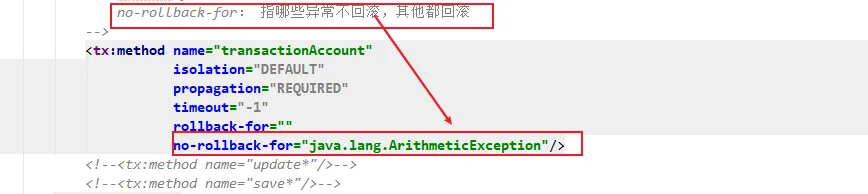
事务的传播行为PropagationBehavior
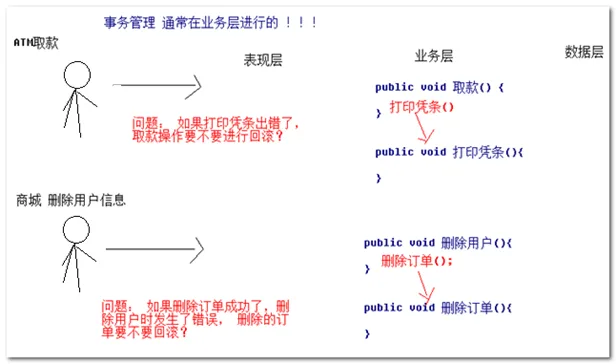
什么是事务的传播行为?
一个事务调用了另 一个事务,如果出现错误,两个事务是否属于同一个事务
有什么作用?
事务传播行为用于解决两个被事务管理的方法互相调用问题
- 事务的传播行为的7种类型
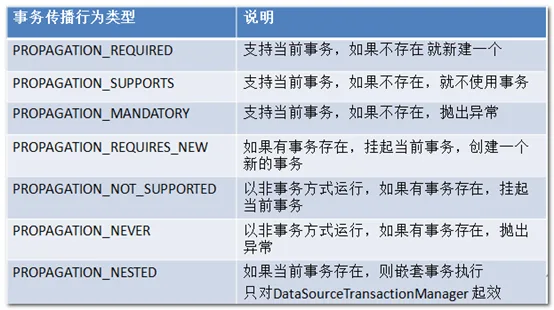
- 主要分为三大类
PROPAGATION_REQUIRED(默认值)、PROPAGATION_SUPPORTS、PROPAGATION_MANDATORY
支持当前事务, A调用B,如果A事务存在,B和A处于同一个事务 。
事务默认传播行为 REQUIRED。最常用的。
PROPAGATION_REQUIRES_NEW、PROPAGATION_NOT_SUPPORTED、PROPAGATION_NEVER
不会支持原来的事务 ,A调用B, 如果A事务存在, B肯定不会和A处于同一个事务。
常用的事务传播行为:PROPAGATION_REQUIRES_NEW
PROPAGATION_NESTED
嵌套事务 ,只对DataSourceTransactionManager有效 ,底层使用JDBC的SavePoint机制,允许在同一个事务设置保存点,回滚保存点
基于_注解声明式事务
导入的依赖包跟xml方式一样
pring-transactional-ann
声明式事务
/**
 * @Auther: yanqi
 */
@Service
// @Transactional //当前类都会被 事务管理
public class AccountService {

    @Autowired
    private AccountDao accountDao;

    @Transactional //事务管理
    public void transactionAccount(String outName, String inName , Double money){
        this.accountDao.out(outName,money);
        int a = 1/0;
        this.accountDao.in(inName,money);
    }

}
- dao层
/**
 * @Auther: yanqi
 * @Desc: 先用jdbcTemplate完成对数据库的操作
 */
@Repository
public class AccountDao extends JdbcDaoSupport {


    /**
     * 随便写一个set方法,注入DataSource,使用父数据源
     * @param dataSource
     */
    @Autowired
    public void setJdbcDaoSupport(DataSource dataSource){
        super.setDataSource(dataSource);
    }

    /**
     * 减钱
     */
    public void out(String name , Double money){
        String sql = "update t_account set money = money - ? where name = ?";
        super.getJdbcTemplate().update(sql,money, name);
    }

    /**
     * 加钱
     */
    public void in(String name , Double money){
        String sql = "update t_account set money = money + ? where name = ?";
        super.getJdbcTemplate().update(sql,money, name);
    }

}
配置注解事务
<!--开启注解-->
<context:component-scan base-package="cn.yanqi"/>

<!--引入外部的配置文件db.properties-->
<context:property-placeholder location="classpath:db.properties"/>

<!--Druid连接池-->
<bean id="dataSource" class="com.alibaba.druid.pool.DruidDataSource">
    <property name="driverClassName" value="${jdbc.driverClassName}"/>
    <property name="url" value="${jdbc.url}"/>
    <property name="username" value="${jdbc.username}"/>
    <property name="password" value="${jdbc.password}"/>
</bean>


<!--事务的平台管理器-->
<bean id="transactionManager" class="org.springframework.jdbc.datasource.DataSourceTransactionManager">
    <property name="dataSource" ref="dataSource"/>
</bean>

<!--开启事务的注解-->
<tx:annotation-driven transaction-manager="transactionManager"/>
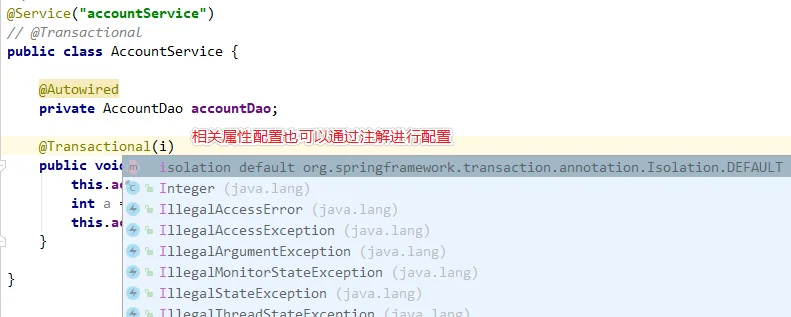
- 配置事务的定义属性信息,在注解中直接配置
- 优化配置
配置注解驱动事务管理的时候,tx:annotation-driven/默认会自动查找并加载名字为transactionManager的事务管理器Bean,因此,当事务管理器的bean的名字为transactionManager 时,可以省略transaction-manager的属性
